Version 1.0.2
@stackline/alex
Inclusive-language checks for prose and Markdown, preserving the alex 11 API and CLI
Installation
npm install @stackline/alex@1.0.2Node.js: >=20.19.0. Read the compatibility and maintenance notes before migrating.
Usage and API
@stackline/alex
Inclusive-language checks for prose and Markdown, preserving the alex 11 API and CLI.



Documentation | npm | Issues | Repository
Package version: 1.0.2
Why this package?
An independent MIT-licensed compatibility fork of alex@11.0.1. The language
checks, word lists, API exports, and default CLI behavior are preserved.
npm install --save-dev @stackline/alex
The executable is still named alex. Version 1.0.0 adds an opt-in flag for
tools that pass explicit filenames, including pre-commit:
alex changed.md ignored.csv --silently-ignore
Files matched by .alexignore are skipped with this flag. Without it, naming an
ignored file explicitly still reports an error. Other files are checked normally,
and missing files remain errors. Default directory discovery continues to honor
ignore rules automatically. This addresses the request in
upstream issue #348.
Node.js 20.19 or newer is supported. The CLI directly uses the compatible
@stackline/unified-engine and @stackline/unified-diff forks. supports-color
is now an explicit dependency. The public type declarations are retained from
the original published package and tested with a TypeScript consumer.
The --diff option also retains warnings on replacement lines correctly when
running on Travis or GitHub Actions. Previously, deleted lines in the same diff
could shift the target line numbers and suppress a warning on a changed line.
For development, run npm ci, npm run build, npm run lint, npm test, and
npm run test:types. These checks do not format or rewrite source files. The
upstream API/CLI tests remain, with additional executable-level regressions for
ignored files. Tape's development-only glob dependency is updated through an
override; it is not part of the installed runtime package.
The source basis is the upstream 11.0.1 tag and the alex@11.0.1 npm artifact,
published on 2023-08-18. The artifact integrity is
sha512-rKLBZxD/lvuykdC6XB8ma9YjDl46j9ayHROZUtC1yJ2jlGpoP7RZR1tBBSjtlr260ixIW6iCkqAnHzmti5Q6CQ==.
The original license and contributor attribution are retained. This fork uses its
own 1.x version series and does not imply upstream endorsement.
The original guide follows. Install and import @stackline/alex when using this
fork; the commands and API behavior remain compatible.

📝 alex — Catch insensitive, inconsiderate writing.
Whether your own or someone else’s writing, alex helps you find gender favoring, polarizing, race related, or other unequal phrasing in text.
For example, when We’ve confirmed his identity is given, alex will warn
you and suggest using their instead of his.
Give alex a spin on the Online demo ».
Why
- Helps to get better at considerate writing
- Catches many possible offences
- Suggests helpful alternatives
- Reads plain text, HTML, MDX, or markdown as input
- Stylish
Origin story
Thanks to @iheanyi for raising the problem and @sindresorhus for inspiring me (@wooorm) to do something about it.
When alex launched, it got some traction on twitter and producthunt. Then there was a lot of press coverage.
Compatibility
| Item | Value |
|---|---|
| Package | @stackline/alex@1.0.2 |
| Supported Node.js | >=20.19.0 |
| Module entry | index.js (ES modules) |
| Runtime dependencies | 22 direct dependencies |
| Types | index.d.ts |
| CLI | alex |
Installation
npm install --save-dev @stackline/alex
$ npm install @stackline/alex --global
Using yarn:
$ yarn global add alex
Or you can follow this step-by-step tutorial: Setting up alex in your project
Usage
import alex from '@stackline/alex';
console.log(alex('He is a master of his craft.').messages);
Features
Checks
alex checks things such as:
- Gendered work-titles (if you write
garbagemanalex suggestsgarbage collector; if you writelandlordalex suggestsproprietor) - Gendered proverbs (if you write
like a manalex suggestsbravely; if you writeladylikealex suggestscourteous) - Ableist language (if you write
learning disabledalex suggestsperson with learning disabilities) - Condescending language (if you write
obviouslyoreveryone knowsalex warns about it) - Intolerant phrasing (if you write
masterandslavealex suggestsprimaryandreplica) - Profanities (if you write
butt🍑 alex warns about it)
…and much more!
Note: alex assumes good intent: that you don’t mean to offend!
See retext-equality and retext-profanities for
all rules.
alex ignores words meant literally, so “he”, He — ..., and the
like are not warned about.
Integrations
- Sublime —
sindresorhus/SublimeLinter-contrib-alex - Gulp —
dustinspecker/gulp-alex - Slack —
keoghpe/alex-slack - Ember —
yohanmishkin/ember-cli-alex - Probot —
swinton/linter-alex - GitHub Actions —
brown-ccv/alex-recommends - GitHub Actions (reviewdog) —
reviewdog/action-alex - Vim —
w0rp/ale - Browser extension —
skn0tt/alex-browser-extension - Contentful -
stefanjudis/alex-js-contentful-ui-extension - Figma -
nickradford/figma-plugin-alex - VSCode -
tlahmann/vscode-alex
Security
Explicit ignored files produce errors by default; the documented --silently-ignore option changes only that handling. Missing files remain errors.
API Surface
Ignoring files
The CLI searches for files with a markdown or text extension when given
directories (so $ alex . will find readme.md and path/to/file.txt).
To prevent files from being found, create an .alexignore file.
.alexignore
The CLI will sometimes search for files.
To prevent files from being found, add a file named .alexignore in one of the
directories above the current working directory (the place you run alex from).
The format of these files is similar to .eslintignore (which
in turn is similar to .gitignore files).
For example, when working in ~/path/to/place, the ignore file can be in
to, place, or ~.
The ignore file for this project itself looks like this:
# `node_modules` is ignored by default.
example.md
Control
Sometimes alex makes mistakes:
A message for this sentence will pop up.
Yields:
readme.md
  1:15-1:18  warning  `pop` may be insensitive, use `parent` instead  dad-mom  retext-equality

⚠ 1 warning
HTML comments in Markdown can be used to ignore them:
<!--alex ignore dad-mom-->

A message for this sentence will **not** pop up.
Yields:
readme.md: no issues found
ignore turns off messages for the thing after the comment (in this case, the
paragraph).
It’s also possible to turn off messages after a comment by using disable, and,
turn those messages back on using enable:
<!--alex disable dad-mom-->

A message for this sentence will **not** pop up.

A message for this sentence will also **not** pop up.

Yet another sentence where a message will **not** pop up.

<!--alex enable dad-mom-->

A message for this sentence will pop up.
Yields:
readme.md
  9:15-9:18  warning  `pop` may be insensitive, use `parent` instead  dad-mom  retext-equality

⚠ 1 warning
Multiple messages can be controlled in one go:
<!--alex disable he-her his-hers dad-mom-->
…and all messages can be controlled by omitting all rule identifiers:
<!--alex ignore-->
Configuration
You can control alex through .alexrc configuration files:
{
  "allow": ["boogeyman-boogeywoman"]
}
…you can use YAML if the file is named .alexrc.yml or .alexrc.yaml:
allow:
  - dad-mom
…you can also use JavaScript if the file is named .alexrc.js:
// But making it random like this is a bad idea!
exports.profanitySureness = Math.floor(Math.random() * 3)
…and finally it is possible to use an alex field in package.json:
{
  …
  "alex": {
    "noBinary": true
  },
  …
}
The allow field should be an array of rules or undefined (the default is
undefined). When provided, the rules specified are skipped and not reported.
The deny field should be an array of rules or undefined (the default is
undefined). When provided, only the rules specified are reported.
You cannot use both allow and deny at the same time.
The noBinary field should be a boolean (the default is false).
When turned on (true), pairs such as he and she and garbageman or garbagewoman are seen as errors.
When turned off (false, the default), such pairs are okay.
The profanitySureness field is a number (the default is 0).
We use cuss, which has a dictionary of words that have a rating
between 0 and 2 of how likely it is that a word or phrase is a profanity (not
how “bad” it is):
| Rating | Use as a profanity | Use in clean text | Example |
|---|---|---|---|
| 2 | likely | unlikely | asshat |
| 1 | maybe | maybe | addict |
| 0 | unlikely | likely | beaver |
The profanitySureness field is the minimum rating (including) that you want to
check for.
If you set it to 1 (maybe) then it will warn for level 1 and 2 (likely)
profanities, but not for level 0 (unlikely).
CLI
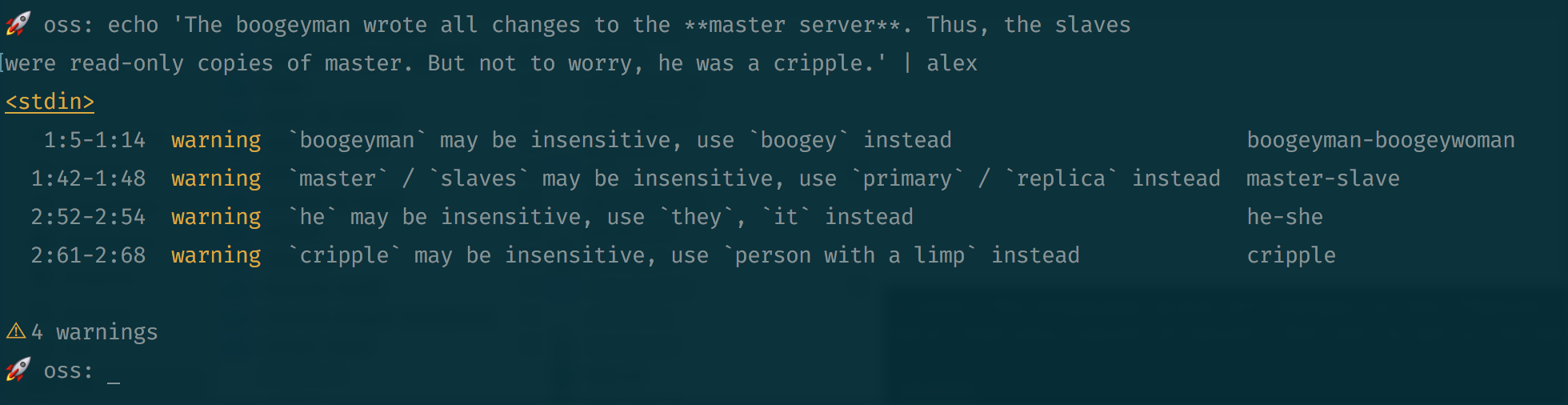
Let’s say example.md looks as follows:
The boogeyman wrote all changes to the **master server**. Thus, the slaves
were read-only copies of master. But not to worry, he was a cripple.
Now, run alex on example.md:
$ alex example.md
Yields:
example.md
   1:5-1:14  warning  `boogeyman` may be insensitive, use `boogeymonster` instead                boogeyman-boogeywoman  retext-equality
  1:42-1:48  warning  `master` / `slaves` may be insensitive, use `primary` / `replica` instead  master-slave           retext-equality
  1:69-1:75  warning  Don’t use `slaves`, it’s profane                                           slaves                 retext-profanities
  2:52-2:54  warning  `he` may be insensitive, use `they`, `it` instead                          he-she                 retext-equality
  2:61-2:68  warning  `cripple` may be insensitive, use `person with a limp` instead             gimp                   retext-equality

⚠ 5 warnings
See $ alex --help for more information.
When no input files are given to alex, it searches for files in the current directory,
doc, anddocs. If--mdxis given, it searches formdxextensions. If--htmlis given, it searches forhtmandhtmlextensions. Otherwise, it searches fortxt,text,md,mkd,mkdn,mkdown,ron, andmarkdownextensions.
This package is ESM only:
Node 14+ is needed to use it and it must be imported instead of required.
npm:
$ npm install @stackline/alex --save
This package exports the identifiers markdown, mdx, html, and text.
The default export is markdown.
markdown(value, config)
Check Markdown (ignoring syntax).
Parameters
value(VFileorstring) — Markdown documentconfig(Object, optional) — See the Configuration section
Returns
VFile.
You are probably interested in its messages property, as
shown in the example below, because it holds the possible violations.
Example
import alex from '@stackline/alex'

alex('We’ve confirmed his identity.').messages
Yields:
[
  [1:17-1:20: `his` may be insensitive, when referring to a person, use `their`, `theirs`, `them` instead] {
    message: '`his` may be insensitive, when referring to a ' +
      'person, use `their`, `theirs`, `them` instead',
    name: '1:17-1:20',
    reason: '`his` may be insensitive, when referring to a ' +
      'person, use `their`, `theirs`, `them` instead',
    line: 1,
    column: 17,
    location: { start: [Object], end: [Object] },
    source: 'retext-equality',
    ruleId: 'her-him',
    fatal: false,
    actual: 'his',
    expected: [ 'their', 'theirs', 'them' ]
  }
]
mdx(value, config)
Check MDX (ignoring syntax).
Note: the syntax for MDX@2, while currently in beta, is used in alex.
Parameters
value(VFileorstring) — MDX documentconfig(Object, optional) — See the Configuration section
Returns
Example
import {mdx} from '@stackline/alex'

mdx('<Component>He walked to class.</Component>').messages
Yields:
[
  [1:12-1:14: `He` may be insensitive, use `They`, `It` instead] {
    reason: '`He` may be insensitive, use `They`, `It` instead',
    line: 1,
    column: 12,
    location: { start: [Object], end: [Object] },
    source: 'retext-equality',
    ruleId: 'he-she',
    fatal: false,
    actual: 'He',
    expected: [ 'They', 'It' ]
  }
]
html(value, config)
Check HTML (ignoring syntax).
Parameters
value(VFileorstring) — HTML documentconfig(Object, optional) — See the Configuration section
Returns
Example
import {html} from '@stackline/alex'

html('<p class="black">He walked to class.</p>').messages
Yields:
[
  [1:18-1:20: `He` may be insensitive, use `They`, `It` instead] {
    message: '`He` may be insensitive, use `They`, `It` instead',
    name: '1:18-1:20',
    reason: '`He` may be insensitive, use `They`, `It` instead',
    line: 1,
    column: 18,
    location: { start: [Object], end: [Object] },
    source: 'retext-equality',
    ruleId: 'he-she',
    fatal: false,
    actual: 'He',
    expected: [ 'They', 'It' ]
  }
]
text(value, config)
Check plain text (as in, syntax is checked).
Parameters
value(VFileorstring) — Text documentconfig(Object, optional) — See the Configuration section
Returns
Example
import {markdown, text} from '@stackline/alex'

markdown('The `boogeyman`.').messages // => []

text('The `boogeyman`.').messages
Yields:
[
  [1:6-1:15: `boogeyman` may be insensitive, use `boogeymonster` instead] {
    message: '`boogeyman` may be insensitive, use `boogeymonster` instead',
    name: '1:6-1:15',
    reason: '`boogeyman` may be insensitive, use `boogeymonster` instead',
    line: 1,
    column: 6,
    location: Position { start: [Object], end: [Object] },
    source: 'retext-equality',
    ruleId: 'boogeyman-boogeywoman',
    fatal: false,
    actual: 'boogeyman',
    expected: [ 'boogeymonster' ]
  }
]
Workflow
The recommended workflow is to add alex to package.json and to run it with
your tests in Travis.
You can opt to ignore warnings through alexrc files and control comments.
A package.json file with npm scripts, and additionally using
AVA for unit tests, could look like so:
{
  "scripts": {
    "test-api": "ava",
    "test-doc": "alex",
    "test": "npm run test-api && npm run test-doc"
  },
  "devDependencies": {
    "alex": "^1.0.0",
    "ava": "^0.1.0"
  }
}
If you’re using Travis for continuous integration, set up something like the
following in your .travis.yml:
 script:
 - npm test
+- alex --diff
Make sure to still install alex though!
If the --diff flag is used, and Travis is detected, lines that are not changes
in this push are ignored.
Using this workflow, you can merge PRs if it has warnings, and then if someone
edits an entirely different file, they won’t be bothered about existing
warnings, only about the things they added!
FAQ
This is stupid!
Not a question. And yeah, alex isn’t very smart. People are much better at this. But people make mistakes, and alex is there to help.
alex didn’t check “X”!
See contributing.md on how to get “X” checked by alex.
Why is this named alex?
It’s a nice unisex name, it was free on npm, I like it! :smile:
Further reading
No automated tool can replace studying inclusive communication and listening to
the lived experiences of others.
An error from alex can be an invitation to learn more.
These resources are a launch point for deepening your own understanding and
editorial skills beyond what alex can offer:
The 18F Content Guide has a helpful list of links to other inclusive language guides used in journalism and academic writing.
The Conscious Style Guide has articles on many nuanced topics of language. For example, the terms race and ethnicity mean different things, and choosing the right word is up to you. Likewise, a sentence that overgeneralizes about a group of people (e.g. “Developers love to code all day”) may not be noticed by
alex, but it is not inclusive. A good human editor can step up to the challenge and find a better way to phrase things.Sometimes, the only way to know what is inclusive is to ask. In Disability is a nuanced thing, Nicolas Steenhout writes about how person-first language, such as “a person with a disability,” is not always the right choice.
Language is always evolving. A term that is neutral one year ago can be problematic today. Projects like the Self-Defined Dictionary aim to collect the words that we use to define ourselves and others, and connect them with the history and some helpful advice.
Unconsious bias is present in daily decisions and conversations and can show up in writing. Textio
offers some examples of how descriptive adjective choice and tone can push some people away, and how regional language differences can cause confusion.
Using complex sentences and uncommon vocabulary can lead to less inclusive content. This is described as literacy exclusion in this article by Harver. This is critical to be aware of if your content has a global audience, where a reader’s strongest language may not be the language you are writing in.
Local Development
Clone the repository and run the following commands from its root:
npm ci
npm run build
npm test
npm run lint
npm run test:types
The retained upstream development notes below include historical tooling; the commands above are the maintained package checks.
Contribute
See contributing.md in get-alex/.github for ways
to get started.
See support.md for ways to get help.
This project has a Code of conduct. By interacting with this repository, organization, or community you agree to abide by its terms.
Release Checklist
- Update the package version, lockfile, generated version fields, and changelog together.
- Run the development checks above and audit both
npm auditandnpm audit --omit=dev. - Use the GitHub publish workflow with its
Prodenvironment to publish the exact CI tarball. - Verify public npm bytes, package identity, provenance, and the immutable GitHub release evidence.
Community and Support
Report reproducible package issues in the issue tracker.
License
MIT. Original copyright notices and upstream attribution are retained.
Acknowledgments
Preliminary work for alex was done in 2015. The project was authored by @wooorm.
Lots of people helped since!
Release changes
Changelog
1.0.2 - 2026-09-28
- Replace stale direct runtime and development dependencies with verified Stackline maintenance forks, preserving existing import names and compatibility tests.
- Use verified @stackline/unified-engine 1.0.2 and @stackline/unified-diff 1.0.3, with packed direct/alias API and CLI consumers.
1.0.1 (2026-09-28)
- Standardize package documentation, preserve the API reference and upstream attribution, and add Stackline community links.
- Add focused npm discovery keywords and consistent repository metadata.
- Keep runtime behavior and dependency versions unchanged.
- Correct the pinned artifact-upload action commit while preserving the publish.yml workflow and Prod environment.
Release files and references
Package bytes, npm provenance and the immutable GitHub release were verified for this version. Security checks describe the reviewed release; documented compatibility risks and upstream reports are not blanket claims of resolution.