HC
Stackline maintained line

@stackline/angular-highcharts

Angular 2.4.10 v2.0.0 All versions
Angular 2 docs

Highcharts wrapper for legacy Angular 2 apps, validated with a real Angular CLI 2 project.

This package keeps the original <chart> contract alive for Angular 2 while covering modern Highcharts usage patterns: standard charts, StockChart, module-backed chart types, projected event directives, native chart access and live data updates.

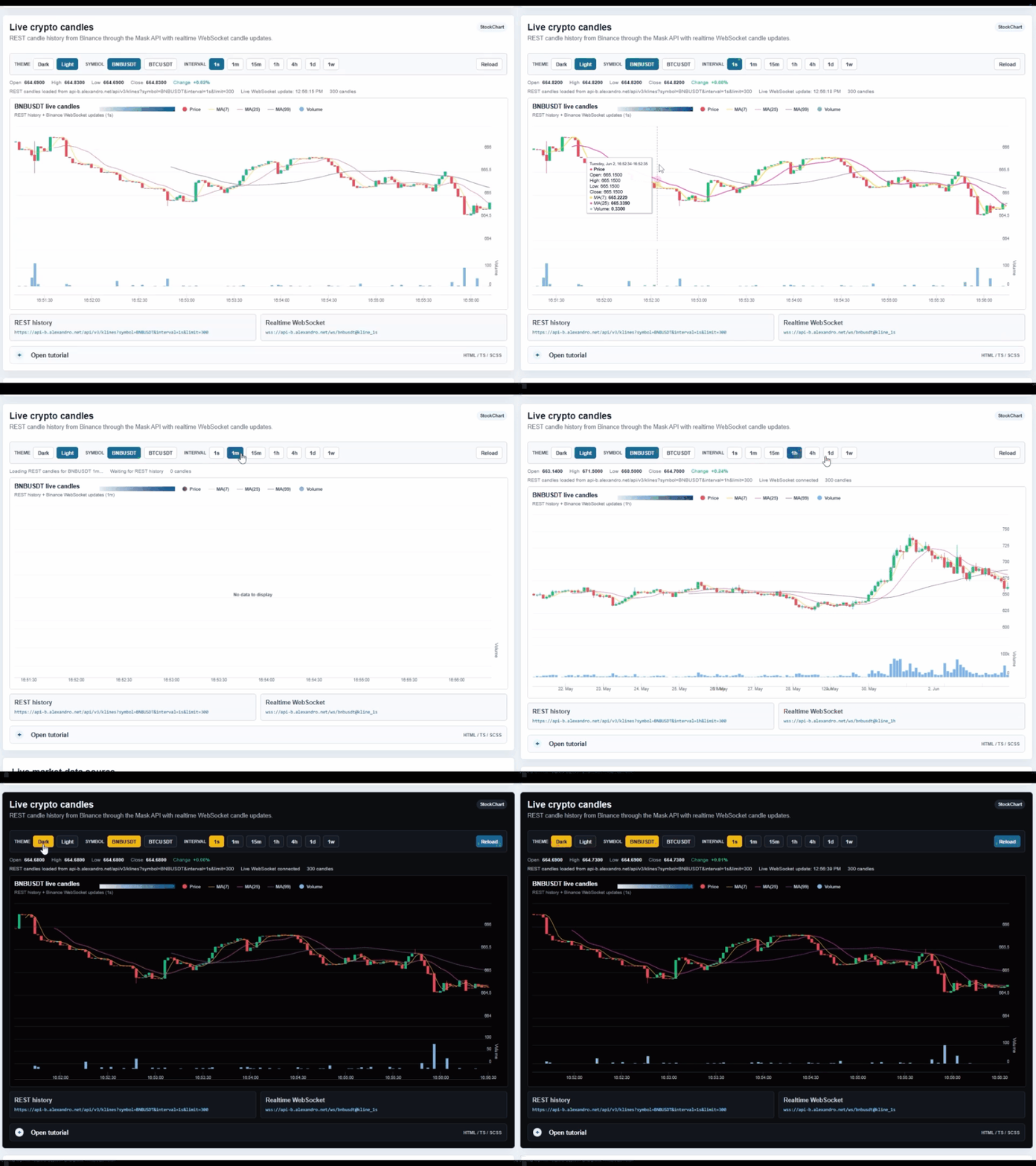
Animated preview of Stackline Angular Highcharts examples
Install

Angular 2 package line

Use the 2.x package family for Angular 2 applications. The live validation project runs Angular 2.4.10, angular-cli beta 28.3 and Highcharts 5.

Angular 2
npm install @stackline/[email protected] highcharts@5 --save
For Angular 2, keep the framework-era packages such as core-js, zone.js, rxjs and ts-helpers in the application when your Angular CLI 2 setup requires them.

app.module.ts

import { BrowserModule } from '@angular/platform-browser';
import { NgModule } from '@angular/core';
import { ChartModule, HighchartsStatic } from '@stackline/angular-highcharts';
import * as Highcharts from 'highcharts';

export function highchartsFactory() {
  return Highcharts;
}

@NgModule({
  imports: [
    BrowserModule,
    ChartModule
  ],
  providers: [
    { provide: HighchartsStatic, useFactory: highchartsFactory }
  ]
})
export class AppModule { }

HTML

<chart
  [options]="options"
  (create)="onCreate($event)"
></chart>

TS

options: any = {
  chart: { type: 'line', height: 340 },
  title: { text: 'Simple chart' },
  xAxis: { categories: ['Jan', 'Feb', 'Mar'] },
  series: [{
    name: 'Orders',
    data: [12, 19, 28]
  }]
};

onCreate(chart: any) {
  console.log(chart.series.length);
}
Live preview

Same examples as the Angular 2 live project

The docs describe the exact live app currently running on the network. The first route uses dynamic data; the secondary route keeps the static chart gallery.

Full line test

Dynamic route

Live crypto candles, live crypto treemap, live price movement, volume, gauges, heatmap, funnel and 3D examples.

Static route

One chart per row with fixed local data: line, spline, area, column, pie, donut, scatter, bubble, stock, map-like and no-data states.

Dynamic examples

Live market data without recreating every chart frame

Dynamic examples update series data through the chart instance where possible, keeping motion progressive instead of blinking the chart surface.

Live crypto candles

StockChart

REST candle history plus WebSocket candle updates. The example defaults to BNBUSDT, 1s interval and light chart theme.

Code layersHTML / TS / SCSS
HTMLTSSCSS
<chart
  [type]="'StockChart'"
  [options]="binanceOptions"
  (create)="onBinanceChartCreate($event)"
></chart>
binanceSymbol = 'BNBUSDT';
binanceInterval = '1s';
binanceTheme = 'light';
binanceOptions: any = this.createBinanceOptions();

onBinanceChartCreate(chart: any) {
  this.binanceChart = chart;
}

private applyLiveCandle(candle: any) {
  var ohlc = this.binanceChart.series[0];
  var volume = this.binanceChart.series[1];
  ohlc.addPoint([candle.time, candle.open, candle.high, candle.low, candle.close], false, true);
  volume.addPoint([candle.time, candle.volume], true, true);
}
.chart-frame {
  width: 100%;
  min-height: 420px;
  border: 1px solid #d9e5ee;
  border-radius: 8px;
  background: #fff;
}

Live crypto treemap

Treemap

Top 50 coins sized by market cap and colored by 24h change. The tooltip stays above the chart and hides correctly on blur, scroll and pointer exit.

Code layersHTML / TS / SCSS
<chart [options]="liveTreemapOptions"></chart>
private createLiveTreemapOptions() {
  return {
    chart: { type: 'treemap', height: 420 },
    title: { text: 'Live crypto treemap' },
    colorAxis: {
      minColor: '#d45d35',
      maxColor: '#1b8c6a'
    },
    tooltip: {
      outside: false,
      pointFormat: '<b>{point.name}</b><br>Market cap: {point.value}'
    },
    series: [{
      type: 'treemap',
      layoutAlgorithm: 'squarified',
      data: this.cryptoTreemapRowsForChart()
    }]
  };
}
.crypto-treemap-chart .highcharts-data-label {
  pointer-events: none;
}

Live price heartbeat spline

Spline

Heartbeat-style normalized pulse from live price and change data, useful when a normal price line has too little visual motion.

Code layersHTML / TS / SCSS
<chart [options]="liveSplineOptions"></chart>
private createLiveSplineOptions() {
  return {
    chart: { type: 'spline', height: 320 },
    title: { text: 'Live price heartbeat spline' },
    xAxis: { type: 'datetime' },
    yAxis: {
      title: { text: 'Normalized pulse' },
      plotLines: [{ value: 100, color: '#94a3b8', width: 1 }]
    },
    plotOptions: {
      spline: { animation: false, marker: { enabled: false } }
    },
    series: this.marketHeartbeatSeries()
  };
}
chart {
  display: block;
  width: 100%;
  min-height: 320px;
}
Static examples

One full-width row per chart type

The secondary live route keeps the deterministic examples for wrapper coverage and visual checks.

Open static route

Common charts

Line, spline, area, areaspline, column, bar, stacked column, pie, donut, scatter, bubble, combination and polar/radar.

Module charts

Gauge, solid gauge, heatmap, treemap, funnel, 3D column, stock, map-like and no-data-to-display states.

API

Wrapper contract

The Angular 2 line keeps the historical wrapper shape so existing apps can migrate package names without changing component structure.

Options input

<chart [options]="options"> renders a Highcharts chart using the provided options object.

Constructor switch

[type]="'StockChart'" selects a Highcharts constructor when stock or map-style constructors are registered.

Create output

(create)="saveChart($event)" exposes the native Highcharts chart instance for progressive data updates.

Projected directives

<series>, <point>, <xAxis>, <yAxis>, <zAxis> and <colorAxis> wire event outputs.

Events

Chart, series, point and axis event outputs

Projected wrapper directives let Angular components listen to Highcharts lifecycle and interaction events without manually walking the chart object.

HTML

<chart
  [options]="directiveOptions"
  (create)="onCreate($event)"
  (load)="record('chart load')"
  (redraw)="record('chart redraw')"
>
  <series (click)="record('series click')">
    <point (click)="record('point click')"></point>
  </series>
  <xAxis (setExtremes)="record('xAxis extremes')"></xAxis>
  <yAxis (setExtremes)="record('yAxis extremes')"></yAxis>
</chart>

TS

events: string[] = [];

record(message: string) {
  this.events.unshift(
    new Date().toLocaleTimeString() + ' - ' + message
  );
  this.events = this.events.slice(0, 8);
}

SCSS

.event-log {
  padding: 14px;
  border: 1px solid #d9e5ee;
  border-radius: 8px;
  background: #f8fbff;
}
Modules

Register Highcharts modules once in Angular 2

The live app registers the modules in the same factory that provides the Highcharts static instance to the wrapper.

Module imports

import * as Highcharts from 'highcharts';
import * as HighchartsMore from 'highcharts/highcharts-more';
import * as Highcharts3d from 'highcharts/highcharts-3d';
import * as Heatmap from 'highcharts/modules/heatmap';
import * as Treemap from 'highcharts/modules/treemap';
import * as Funnel from 'highcharts/modules/funnel';
import * as SolidGauge from 'highcharts/modules/solid-gauge';
import * as Stock from 'highcharts/modules/stock';
import * as MapModule from 'highcharts/modules/map';
import * as Drilldown from 'highcharts/modules/drilldown';
import * as NoData from 'highcharts/modules/no-data-to-display';

Factory

export function highchartsFactory() {
  HighchartsMore(Highcharts);
  Highcharts3d(Highcharts);
  Heatmap(Highcharts);
  Treemap(Highcharts);
  Funnel(Highcharts);
  SolidGauge(Highcharts);
  Stock(Highcharts);
  MapModule(Highcharts);
  Drilldown(Highcharts);
  NoData(Highcharts);
  return Highcharts;
}

Provider

@NgModule({
  imports: [BrowserModule, ChartModule],
  providers: [
    { provide: HighchartsStatic, useFactory: highchartsFactory }
  ]
})
export class AppModule { }
Wrapper capabilities

Coverage summary

Options API <chart [options]="options">
Constructor switch [type]="'StockChart'"
Directive events <series>, <point>, <xAxis>, <yAxis>
Highcharts modules more, 3d, heatmap, treemap, funnel, solid-gauge, stock, map, drilldown
AI-ready documentation @stackline/angular-highcharts Angular 2 AI and SEO resources

Text-first files for AI coding assistants, search engines, audits, and fast adoption guidance.

#Stackline #Angular #Highcharts #Charts #DataViz #JavaScript #OpenSource #NPM #AIReadyDocs